A Windows desktop tool that helps programming instructors decide which C submissions deserve a closer look, by comparing code similarity and each student’s own coding style.
Context
Group undergraduate thesis
My role
Lead Software Developer (role description approved by the thesis team)
Status
Final thesis release 1.3.1; development frozen
Stack
C++17, Win32 API, GDI+, MinGW-w64, Inno Setup
Not yet verified: detection accuracy (never measured). Screenshots use a small synthetic dataset, and CALSS only flags code for an instructor to review; it never decides that plagiarism happened.
The problem
An instructor with a few hundred C submissions can’t read every pair side by side. CALSS narrows that down: it compares submissions and points to the pairs, and the exam answers, that look unusual enough to be worth reading closely.
A flag means a submission may deserve a closer look. It is not evidence of misconduct. Every result needs an instructor to read the code and weigh other evidence before reaching any conclusion.
How the analysis works
One run goes through seven steps, all on the instructor’s own PC.
1
Load
Reads .c files from a folder (one level of class subfolders) or imported files. Google Classroom sync is optional.
2
Sort and check
Separates exams, quizzes and activities, keeps comparisons within the same term period, and flags files that look like another language saved as .c.
3
Compare code
Normalizes tokens so renamed variables still match, then scores similarity as 40% Jaccard overlap plus 60% longest common subsequence.
4
Compare style
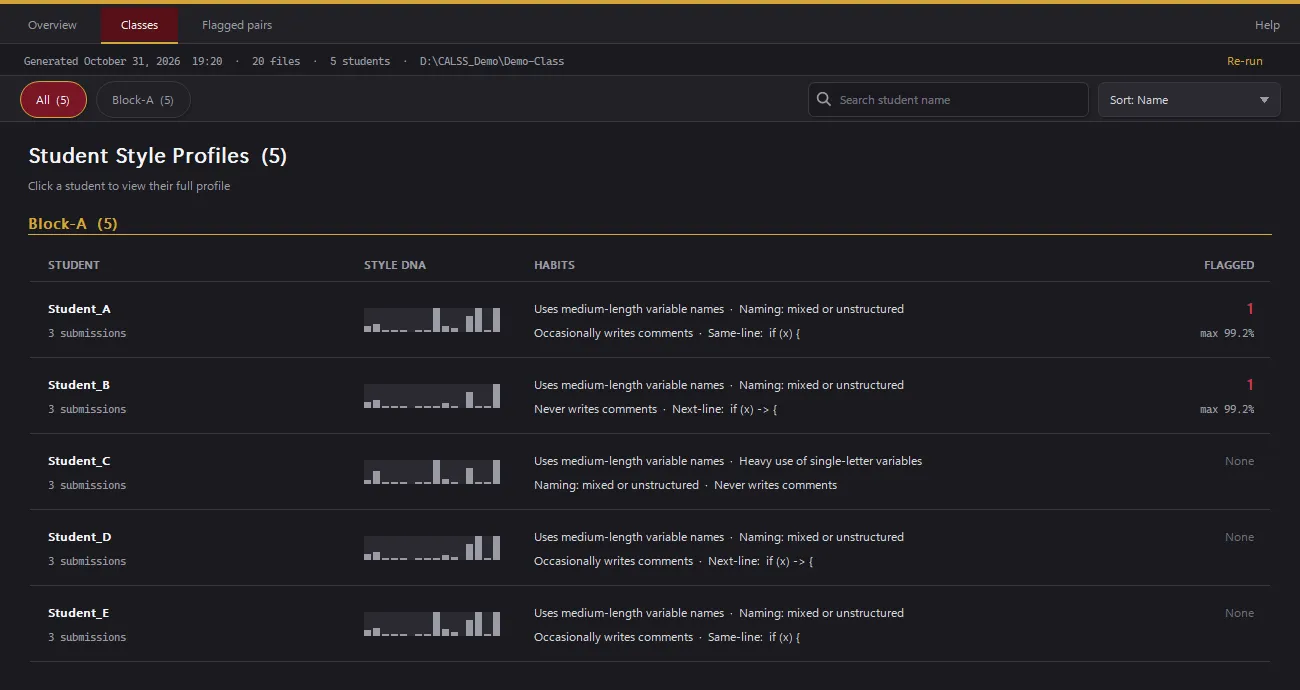
Measures 14 coding-style features, such as naming, comments, braces, loop choice, spacing and function length, and builds each student’s profile from their activities.
5
Score pairs
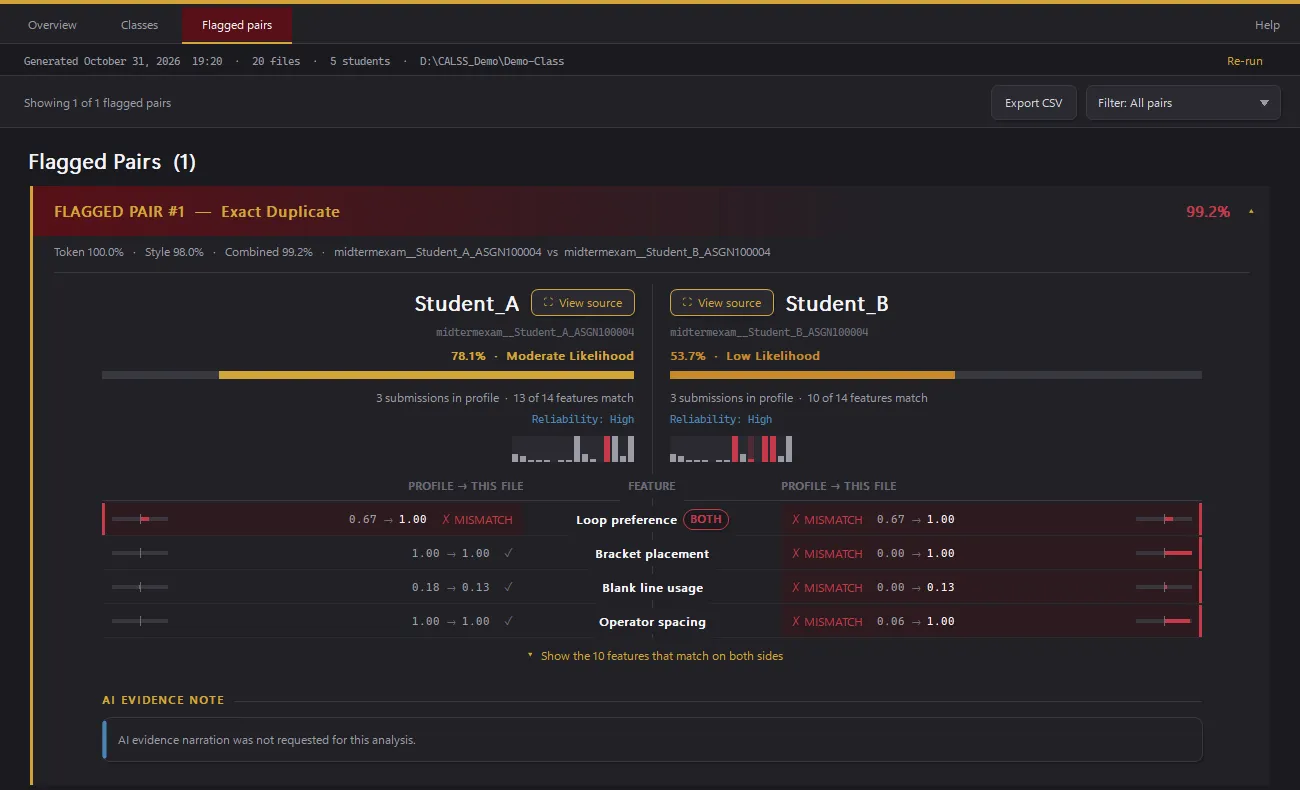
Combines 60% code similarity with 40% style similarity. Pairs at 75% or above are flagged.
6
Check authorship
Compares an exam with the student’s own three closest past submissions (k-nearest neighbours) to spot work that doesn’t match their usual style.
7
Review
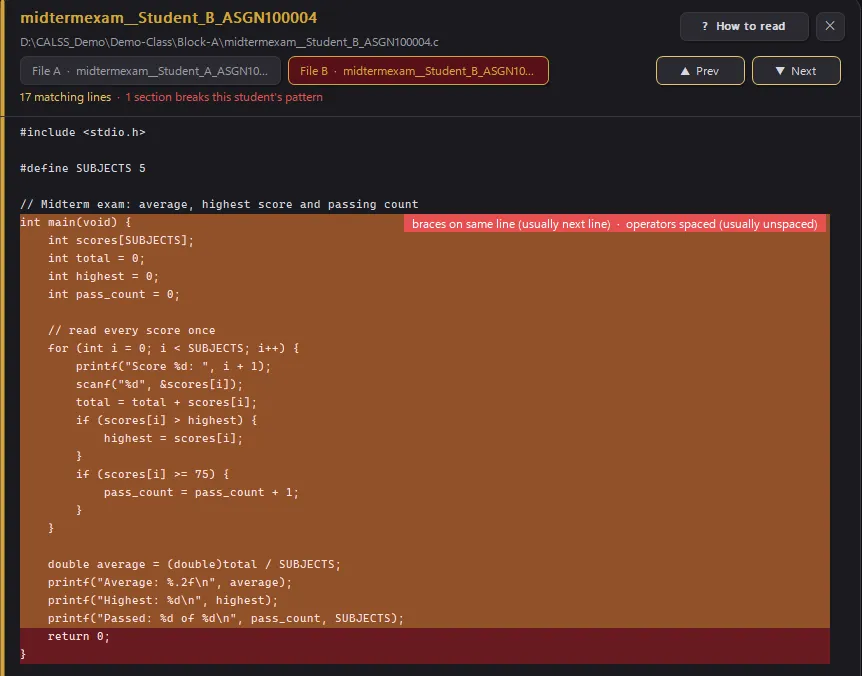
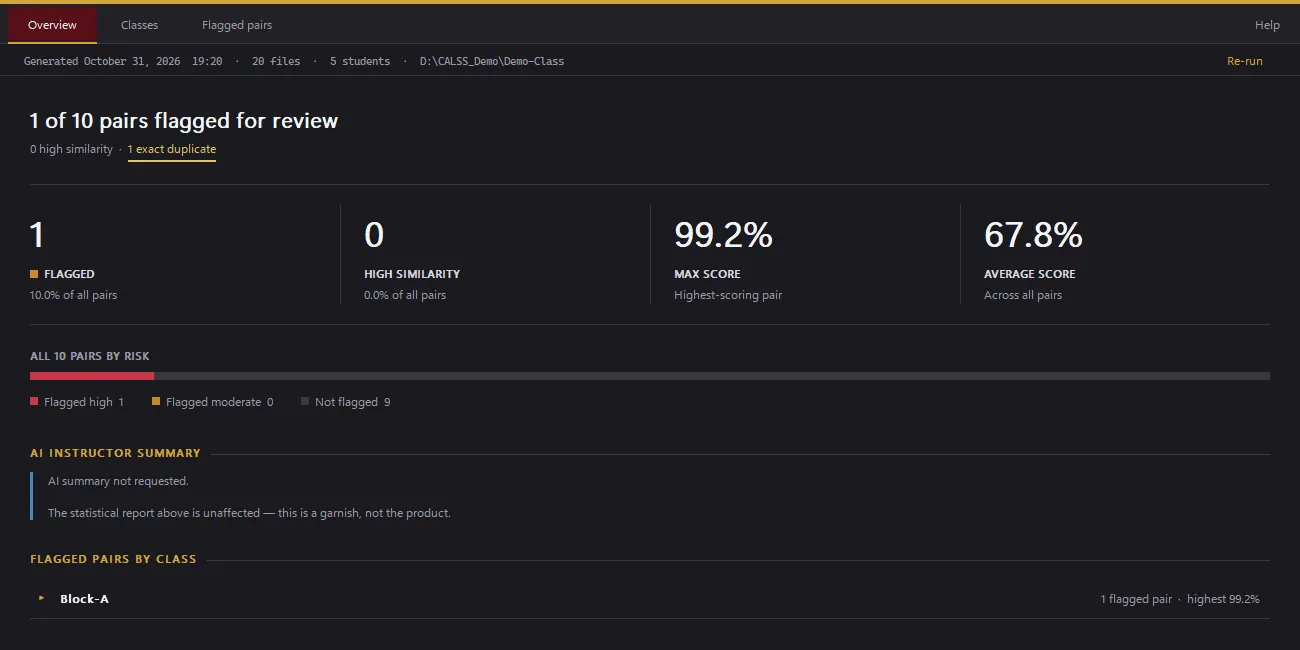
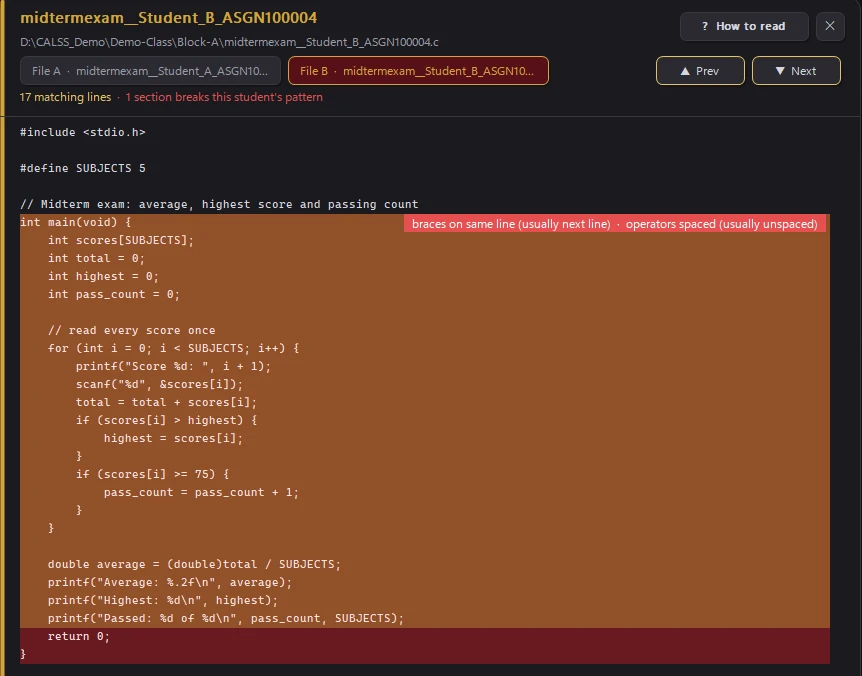
Overview, per-student style profiles, a flagged-pair list, and a source comparison viewer (File A and File B tabs) that highlights shared code and style breaks. Exports to CSV and an HTML report; every run is written to an append-only audit log.
Architecture
A native Windows application with no UI framework: one statically linked executable of about 21,000 lines of C++17.
Analysis pipeline
Tokenizer, style features, nearest-neighbour model and similarity scoring, separate from the interface. Analysis runs on a worker thread so the window stays responsive.
Interface
Drawn directly with the Win32 API and GDI+: overview, classes, flagged pairs and the source comparison view.
Integrations
Optional Google Classroom sync and optional AI explanations for up to 50 flagged pairs, off unless an instructor adds their own key. Keys and sign-in tokens are kept in Windows Credential Manager, not in files.
Packaging
Inno Setup installer and a lab deployment package with checksums and synthetic sample data.
Engineering decisions
Make results reproducible
A golden regression test runs the full analysis on three synthetic datasets and requires every output file to match byte for byte, so changes can’t silently shift scores.
Make it fast enough for a whole class
Caching each file’s tokens and features once per run cut a 2,973-file analysis from about 28 s to about 7.4 s. Reworking the class view cut redraws from about 830 ms to about 58 ms per frame.
Make it run on other PCs
Static linking removed a missing-DLL failure, the GUI subsystem removed a stray console window, paths became UTF-8 end to end, and the app never writes to its install folder.
Keep secrets out of files
API keys and Classroom tokens moved into Windows Credential Manager, and the release script removes stray secret files.
Write down the method’s limits
The project documents where its own scoring falls short, listed under Limitations below, instead of hiding it.
Testing and validation
These are engineering checks: they show the results are reproducible and the app is fast enough. They say nothing about how accurately CALSS detects copying, which hasn’t been evaluated yet. All were recorded on my development PC (Windows 11) during the thesis releases.
3 / 3
Synthetic datasets reproduced byte for byte
Golden regression test, release 1.3.1
89
Session-restore unit checks passed
0 failed
≈28 s → ≈7.4 s
2,973-file analysis time
Development PC, after per-run caching
830 → 58 ms
Class view redraw per frame
Development PC
My own clean-install, upgrade and uninstall tests ran on the development PC, not on the laboratory’s computers. Testing on my teammates’ PCs, and the later laboratory deployment, are reported by the team; I don’t hold records of either.
Limitations
Accuracy is unmeasured
Precision and recall against the datasets’ answer keys have not been calculated, so no accuracy claim is made.
Many pairs get flagged
At the 75% threshold, 32–64% of compared pairs in the validation datasets are flagged. Short exercises naturally look alike.
Long identical files can be missed
The sequence comparison stops at 500 tokens, so an identical file of about 314 lines scores 74% and isn’t flagged.
Thin profiles
Students with few submissions have weak style profiles.
Not production-grade
The installer is unsigned, Classroom sign-in runs in Google’s test mode, and my own testing didn’t cover Windows 10.
Privacy trade-off
When the optional AI summary is on, student names and scores for flagged pairs are sent to Google.
Slow first load
Loading a multi-folder dataset for the first time takes about 41 s because of repeated file reads.
How I built it
I was the Lead Software Developer of our group thesis, and my thesis team has approved that description of my role. Leading the software didn’t mean building everything alone. The thesis methodology was decided together as a team.
In my own description of the work, I set the direction and requirements, and I worked with an AI coding assistant (Claude Code) on the implementation: it drafted and revised code and helped review it, while I decided what changed, reviewed the results, and ran and recorded the tests and releases.
Every commit in the project’s recorded history (August to October 2026) lists the assistant as a co-author. That shows it was involved throughout that period. It doesn’t measure who wrote which code. Work from earlier in the year, including anything my teammates wrote, isn’t in that history.
Where it stands
Development is frozen at release 1.3.1, the final thesis release. The team reports that it was installed on approved laboratory instructor PCs with the lab administrator’s approval. I didn’t test those machines myself.
Screenshots
These are genuine screenshots of CALSS 1.3.1 running on a small synthetic dataset written for this demonstration: five fictional students, including one deliberately similar submission pair. They show how CALSS presents its results, not how accurately it detects copying.
Open full-size screenshot: Source comparison viewerStudent_B’s exam in the File B tab. Gold lines also appear in Student_A’s file, even with renamed identifiers; the red band marks the section that breaks Student_B’s usual formatting. Synthetic data.
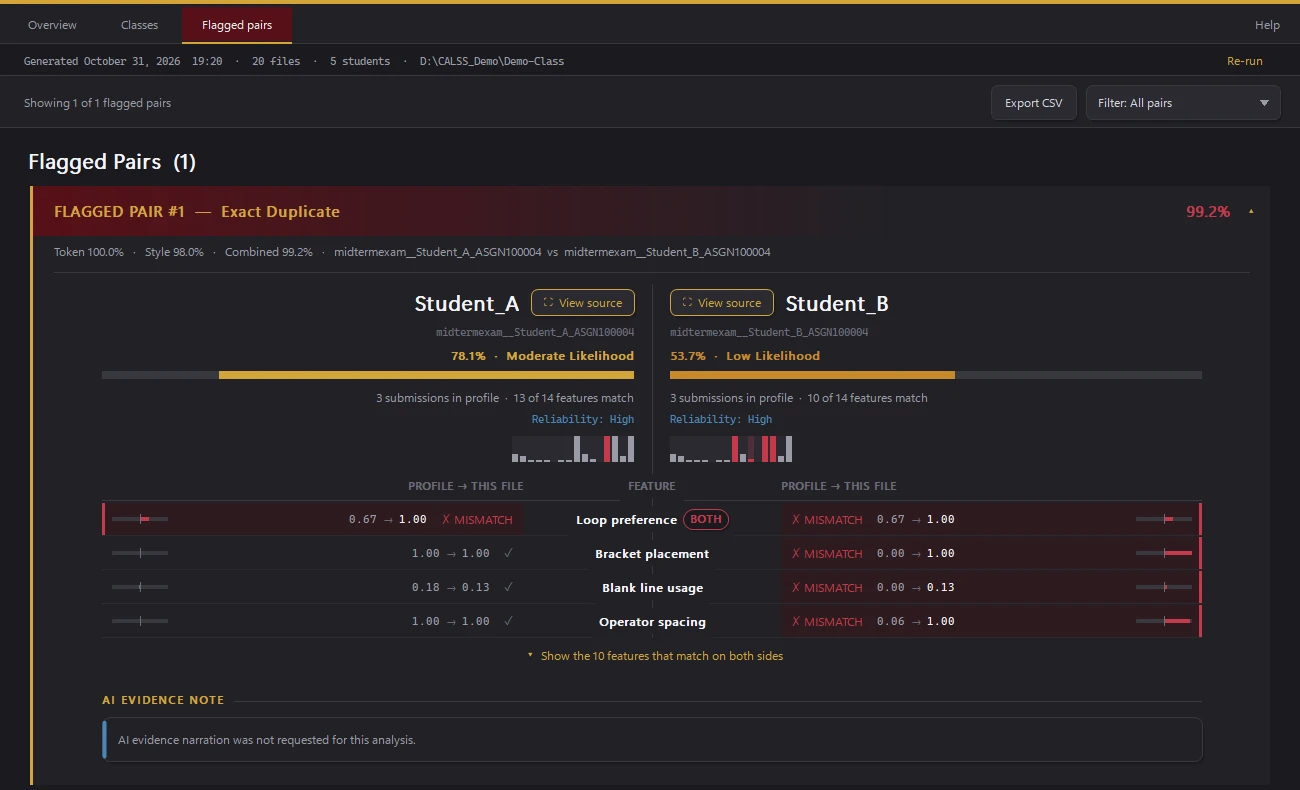
Open full-size screenshot: Flagged pair breakdownCALSS labels this pair “Exact Duplicate” at 99.2% combined. That is CALSS’s category: the two files aren’t byte-identical, since one variable was renamed. Student_B’s exam also scores Low against Student_B’s own past style. A flag is a prompt for review, not proof. Synthetic data.
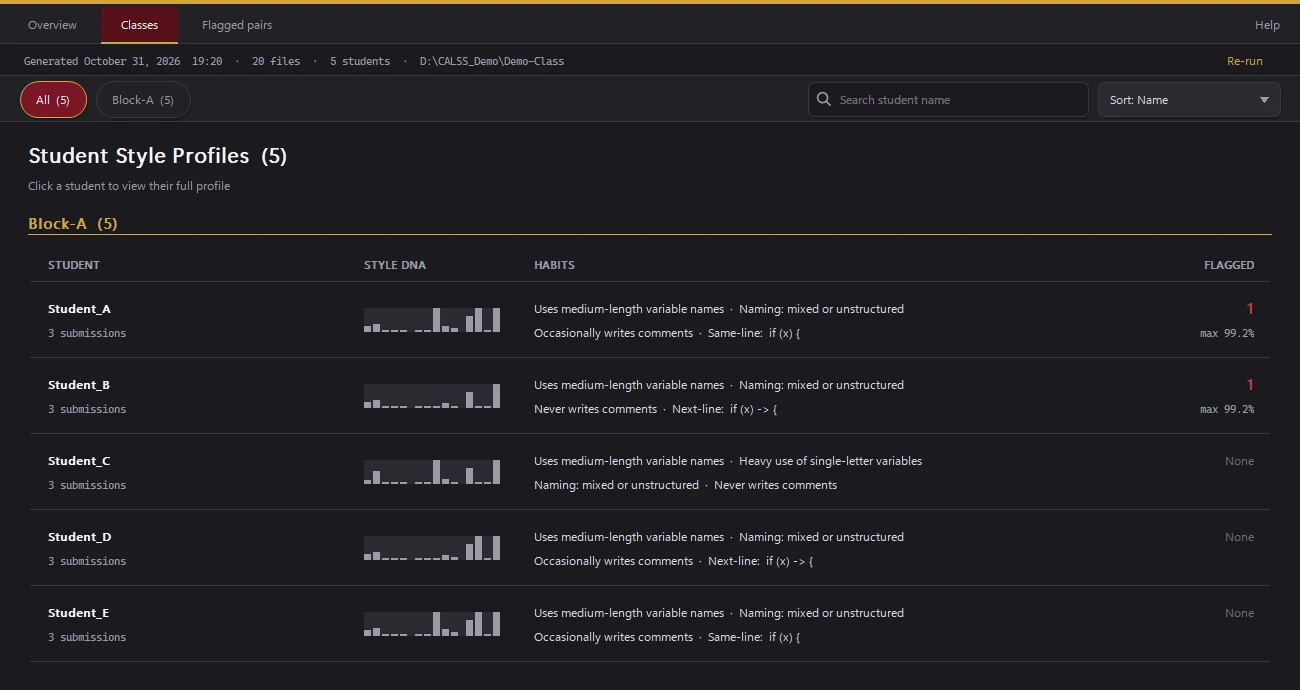
Open full-size screenshot: Class style profilesCoding-style habits for each student, built from three activities each. Synthetic class of five.
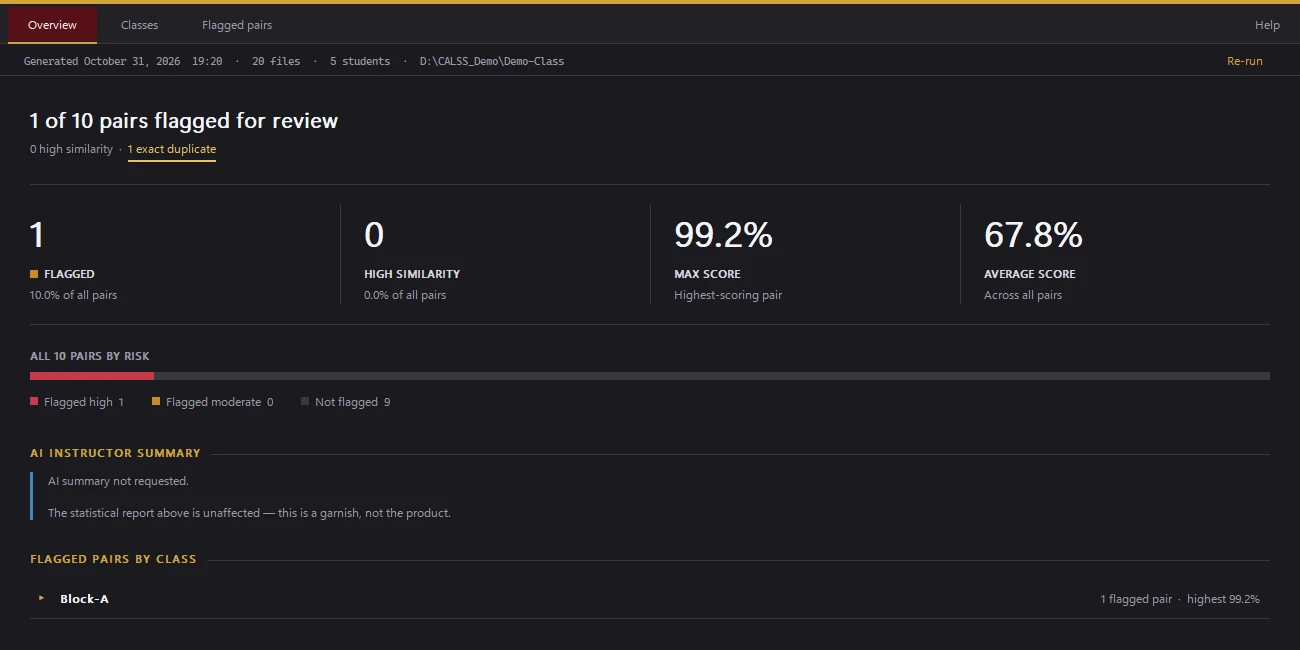
Open full-size screenshot: Analysis overviewOne of ten exam pairs flagged for review, with the AI summary off. Synthetic class of five.
Each image opens at full size. The dataset is synthetic; no student work was used. The demo folder path visible in the screenshots is a temporary local folder.